Livestream video
ATEM Mini Pro vs ATEM Mini Extreme
Quick answer
Count your HDMI sources. Three cameras plus a slide computer fills all four inputs on the Pro with nothing spare, so a church planning a third camera should price the Extreme at $1,249.00 first. Two cameras and slides leaves the Pro comfortable at $349.00.

Blackmagic Design ATEM Mini Pro HDMI Live Stream Switcher
$349.00 Specs and sizingFour HDMI inputs, a hardware streaming encoder and a multiview output, which covers the standard church livestream of two or three cameras plus slides.
Best for: The standard church livestream: two or three cameras plus slides
Check price on Amazon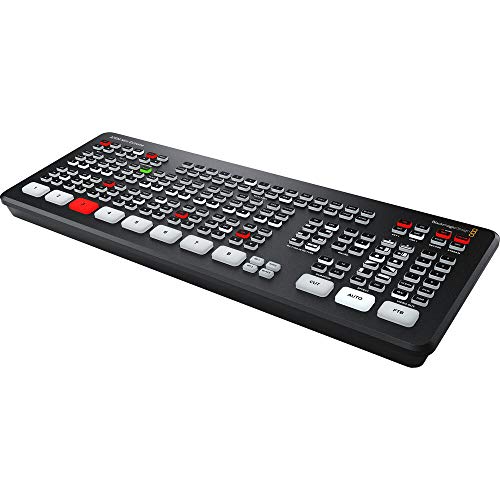
Blackmagic Design ATEM Mini Extreme HDMI Switcher
$1,249.00 Specs and sizingEight inputs, four chroma keyers and two media players, which covers a multi-camera room with lower thirds and lyrics without a separate graphics computer.
Best for: Four or more cameras, or a service with real on-screen graphics
Check price on AmazonDo the input arithmetic before anything else, because it decides this on its own. The Pro has four HDMI inputs and the Extreme has eight, and a church running three cameras and a slide computer has already used all four. There is no expansion path: if you outgrow the Pro you buy a second switcher or you replace it.
The price gap is substantial at $349.00 against $1,249.00, so most churches should start with the Pro and mean it. Buy the Extreme when the input list genuinely needs more than four sources, not because more inputs sounds like useful headroom. Plan the whole chain in the livestream guide.
Side by side
| Model | Price | Video inputs | Maximum resolution | Streaming output | Video outputs |
|---|---|---|---|---|---|
| Blackmagic Design ATEM Mini Pro HDMI Live Stream Switcher | $349.00 | 4 | 1080p60 | Direct to YouTube, Facebook and RTMP | 2 |
| Blackmagic Design ATEM Mini Extreme HDMI Switcher | $1,249.00 | 8 | 1080p60 | Direct to RTMP | 4 |
Count your sources against the input budget
Write down every HDMI source your service uses, including the ones somebody wants to add next year. Then find your row.
Three cameras plus a slide computer fills every input on the ATEM Mini Pro, which is why churches that plan a third camera should price the Extreme before buying the Pro twice.
| Sources on a typical Sunday | Inputs used | Fits the Pro (4) | Fits the Extreme (8) |
|---|---|---|---|
| One camera plus slides | 2 | Yes, two spare | Yes |
| Two cameras plus slides | 3 | Yes, one spare | Yes |
| Three cameras plus slides | 4 | Exactly full, nothing spare | Yes, four spare |
| Three cameras, slides and a graphics computer | 5 | No | Yes |
| Four cameras, slides, lyrics and a playback laptop | 7 | No | Yes, one spare |
| An overflow room feed as a separate output | Needs a spare output | Two outputs total | Four outputs total |
Remember that the slide or lyrics computer is an HDMI source and consumes an input exactly like a camera does. Churches routinely forget this and discover it on the day the third camera arrives.
Choose the Pro for two or three cameras and slides
This is the standard church livestream and the Pro is built for it. Four inputs covers two cameras, a slide computer and a spare, the built-in encoder streams without a computer, and the multiview lets one operator see everything at once. At $349.00 it is also the price point a church committee approves without a special meeting.
Most churches never outgrow it, and the ones that do usually outgrow it in a predictable direction. If you are running two cameras today and have no concrete plan for a third, buy the Pro. The money saved is better spent on a second camera, on a proper audio interface at $224.99, or on lighting the platform properly, all of which do more for the stream than spare inputs would.
If re-editing the service matters to you, the Pro ISO at $585.00 records all four inputs separately plus a project file, so a bad camera cut can be fixed afterwards instead of living forever in the archive. That is a different upgrade from the Extreme and often the more useful one for a church producing a podcast. See recording a church service.
Choose the Extreme for four or more sources and real graphics
Eight inputs is the reason to buy it, and four keyers is the second. A church running four cameras, a lyrics feed, a playback laptop and a graphics computer needs both, and trying to reach that with two Pros and a cascade is more fragile and harder for a volunteer to operate than one larger switcher.
The two media players and four keyers mean lower thirds, name captions and lyric overlays can live inside the switcher rather than on a separate computer that has to be running and correct. For a church that wants a broadcast look without adding another machine to the chain, that consolidation is the real value. The four outputs also cover an overflow room feed or a confidence monitor without robbing the multiview.
Be honest about whether you need it. The Extreme is more than most churches will ever use, and a switcher with eight inputs still needs eight sources, eight cables and somebody who can cut between them under pressure. If you have three cameras and a volunteer rota, the Extreme will spend Sunday morning running four inputs at four times the price. The Extreme ISO G2 at $2,249.00 belongs to a multi-campus operation with a dedicated video team, and is covered in multi-campus AV.
Sources
- Blackmagic Design published ATEM Mini series specifications
Frequently asked questions
Can we chain two ATEM Mini Pros to get more inputs?
Technically yes, by feeding the output of one into an input of the other, but it is a poor arrangement for a church. The operator has to think about two devices, the second switcher sees only a finished mix from the first, and a volunteer cannot easily cut to any source. One larger switcher is simpler and more reliable.
Does the slide computer really use a camera input?
Yes, it is an HDMI source and consumes an input exactly like a camera. This is the most common planning mistake churches make with the Pro, because they count cameras and forget the presentation output. Write the full source list before buying, including anything somebody has already asked for next year.
What is the ISO version and do we need it?
An ISO model records every input separately alongside the programme mix, plus a project file that opens in editing software with the cuts already in place. It is valuable if you re-edit the service into a podcast or a highlights reel. If your archive is simply the live stream recording, it is money better spent elsewhere.
Will the Extreme make our stream look more professional?
Only through the graphics, and only if somebody builds them. The image quality from both switchers is the same 1080p. What the Extreme adds is the ability to key lower thirds and lyrics without another computer. A well lit platform and clean audio will do more for how professional the stream looks than either switcher will.
How long can our HDMI cables be?
Shorter than most church runs, which catches people out. A long run from a balcony camera to the booth will exceed what ordinary HDMI cable manages reliably, and the failure is intermittent rather than obvious. Use an HDMI extender over Cat6, or choose cameras with SDI outputs and convert at the switcher.
Researched, not professional advice. This page is compiled from published manufacturer specifications, operator manuals, FCC rules, published standards and owner-review consensus, not hands-on testing. Sound system design, rigging loudspeakers overhead, and any electrical work are jobs for a qualified professional: have flown loudspeakers and their attachment points signed off by a structural engineer or a certified rigger, and have all wiring done by a licensed electrician to your local code. Wireless microphone rules change, so confirm the current FCC position before buying. As an Amazon Associate we earn from qualifying purchases.