Video and livestream
Livestream Bitrate and Upload Calculator
Quick answer
A 1080p stream at 30 frames per second needs about 4,660 kbps including audio, which means roughly 9.3 Mbps of measured upload once you allow the standard two times headroom. That is about 2.1 GB of data per hour of service.
Two numbers decide whether a church livestream works, and only one of them is on the equipment invoice. The first is bitrate, which follows directly from resolution and frame rate. The second is the upload speed the building actually has at ten o'clock on a Sunday morning, which is almost never the number on the internet bill.
The rule that saves churches is the headroom multiple: a stream needs roughly twice its bitrate in measured upload, because the building is simultaneously carrying Wi-Fi, phones and the office network. Enter your target below.
Livestream bitrate and upload calculator
Upload speed you need
Streaming gear that matches your setup
Top matches update when you change your numbers.

Blackmagic Design ATEM Mini Pro HDMI Live Stream Switcher
$349.00 Specs and sizingFour HDMI inputs, a hardware encoder that streams straight to YouTube or Facebook with no computer, and a multiview output so the operator sees every camera at once. The no-computer part is what makes it work with volunteers.
Best for: The standard church livestream: two or three cameras plus slides
Check price on Amazon
Blackmagic Design ATEM Mini Pro ISO HDMI Switcher
$585.00The Pro with isolated recording of all four inputs plus a project file, so a bad camera cut can be fixed afterwards instead of living forever in the archive.
Best for: Churches that re-edit the service for a podcast or a highlights reel
Check price on Amazon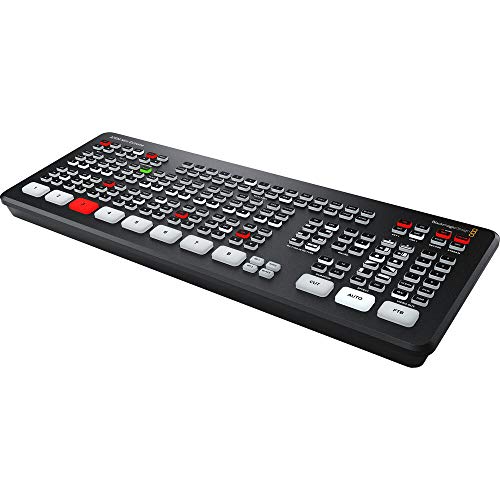
Blackmagic Design ATEM Mini Extreme HDMI Switcher
$1,249.00 Specs and sizingEight inputs, four chroma keyers and two media players, which covers a multi-camera room with lower thirds and lyrics without a separate graphics computer.
Best for: Four or more cameras, or a service with real on-screen graphics
Check price on Amazon
Blackmagic Design ATEM Mini Extreme ISO G2 8-Input HDMI Live Production Switcher
$2,249.00The current generation Extreme with isolated recording of every input. The most capable switcher here, and more than most churches will ever use.
Best for: A multi-campus broadcast operation with a dedicated video team
Check price on Amazon
Elgato Cam Link 4K Capture Card for DSLR, Camcorder, Action Cam, USB-A Connector, USB 3.0 Hardware Interface, Black, Windows 10/11 and macOS
$89.99The capture device that actually works. The no-name HDMI dongles at a fifth of the price drop frames and lose sync mid-service, and this one does not.
Best for: Putting one camera into a computer running OBS or a meeting platform
Check price on Amazon
Elgato 4K X Capture Card, HDMI 2.1, 4K144 Ultra-Low Latency
$249.99A higher bandwidth capture card with very low latency, for a computer-based system where the operator is cutting live off the preview.
Best for: A software switching setup where preview lag is the problem
Check price on Amazon
Focusrite Scarlett 2i2 4th Gen USB-C Audio Interface
$224.99 Specs and sizingThe simplest honest way to get a clean stereo feed from the console into the streaming computer, which is far better than taking audio from the camera microphone.
Best for: Fixing the single most common livestream complaint: bad audio
Check price on Amazon
Focusrite Scarlett 4i4 4th Gen USB-C Audio Interface
$299.99 Specs and sizingFour in and four out, which lets the stream take a dedicated mix from the console and send a return feed back for talkback or a confidence monitor.
Best for: A stream that needs its own mix rather than a copy of the house mix
Check price on Amazon
Focusrite Scarlett 18i16 4th Gen USB-C Audio Interface
$569.99 Specs and sizingEighteen inputs, which is enough to record the service in multitrack and remix the stream audio later rather than living with what went out.
Best for: Churches producing a polished archive or podcast from the Sunday recording
Check price on Amazon
Behringer UMC202HD Audiophile 2x2, 24-Bit/192 kHz USB Audio Interface with Midas Mic Preamplifiers
$86.90A two channel interface with Midas preamps under a hundred dollars, which removes any excuse for streaming the camera microphone.
Best for: The cheapest fix for livestream audio
Check price on Amazon
Behringer UMC204HD Audiophile 2x4, 24-Bit/192 kHz USB Audio/MIDI Interface with Midas Mic Preamplifiers
$97.98The UMC202HD with four outputs, so the streaming computer can also feed a foldback or a recorder.
Best for: A small stream setup that needs a second output
Check price on Amazon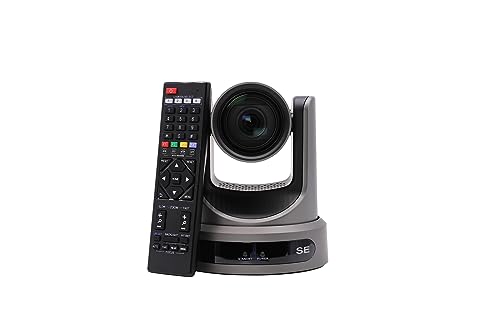
PTZOptics Move SE 20x 1080p Full HD PTZ Auto-Tracking Pan Tilt Zoom Camera
$1,281.55 Specs and sizingA 20x pan tilt zoom camera with power over Ethernet and auto-tracking, so one cable does video and power and one volunteer can run three cameras.
Best for: The standard church livestream camera, on a balcony rail or a side wall
Check price on Amazon
PTZOptics Move 4K 12X Optical Zoom Camera - Grey
$1,999.00 Specs and sizingA 4K camera with NDI, and a 12x lens that is wide enough to hold the whole platform from the back of a small room. Shooting 4K and delivering 1080p lets you crop in post without losing resolution.
Best for: A wide shot from close in, where a long lens cannot get the whole platform
Check price on Amazon
PTZOptics Move 4K 20x Auto-Tracking PTZ Camera
$2,231.00 Specs and sizingThe 4K auto-tracking camera at the zoom range most sanctuaries need, with NDI so it rides the existing network instead of a new SDI run.
Best for: A mid-size to large room with a network already in place
Check price on Amazon
Canon XA60 Professional UHD 4K Camcorder Lens Kit
$1,949.00A traditional camcorder with a 20x zoom, XLR audio inputs and UVC streaming over USB, so it appears to a computer as a webcam with no capture card at all.
Best for: A manned camera operator position, and outreach video off site
Check price on Amazon
SONY Cinema Line FX30 Super 35 Camera
$2,098.00A Super 35 cinema camera for the one shot that should look like film rather than like a security camera, usually the locked-off close shot of the speaker.
Best for: A hero camera alongside pan tilt zoom cameras, or a church producing separate video content
Check price on AmazonOn this page
What bitrate does a church livestream need?
Platform guidance for each resolution and frame rate, with audio included and the two times upload headroom applied. Most churches should be reading the 1080p 30 fps row.
A 1080p30 church livestream needs about 4,660 kbps, roughly 9.3 Mbps of measured upload, and uses about 2.1 GB of data per hour.
| Resolution and frame rate | Video bitrate | Total with audio | Upload needed | Data per hour |
|---|---|---|---|---|
| 720p 30 fps | 3,000 kbps | 3,128 kbps | 6.3 Mbps | 1.4 GB |
| 720p 60 fps | 4,500 kbps | 4,628 kbps | 9.3 Mbps | 2.1 GB |
| 1080p 30 fps | 4,500 kbps | 4,660 kbps | 9.3 Mbps | 2.1 GB |
| 1080p 60 fps | 6,800 kbps | 6,960 kbps | 13.9 Mbps | 3.1 GB |
| 1440p 30 fps | 9,000 kbps | 9,192 kbps | 18.4 Mbps | 4.1 GB |
| 4K 30 fps | 15,000 kbps | 15,192 kbps | 30.4 Mbps | 6.8 GB |
| 4K 60 fps | 25,000 kbps | 25,192 kbps | 50.4 Mbps | 11.3 GB |
Upload needed applies a two times headroom multiple, which is the practical figure rather than the theoretical minimum. Streaming at exactly your measured upload speed produces a stream that buffers whenever anything else uses the connection.
Why is the upload speed double the bitrate?
Three reasons, and each one has ended a church service.
The advertised speed is a download figure. A "300 Mbps" plan commonly has 10 or 20 Mbps of upload behind it, and on some cable and DSL services far less. Upload is what a stream uses.
The building is doing other things. Congregation phones on the guest network, the office, a second campus feed, cloud backups and whatever the children's ministry is streaming all come out of the same pipe. A stream sized to the whole connection is a stream that stutters every time somebody opens a video.
Real connections vary. Consumer and small business internet is contended, which means the speed depends on how many neighbours are using it. Sunday mid-morning is a busy period.
So measure, do not assume. Run a speed test on a wired connection, from the position the encoder will sit, at the time the service actually happens. A Tuesday afternoon Wi-Fi test tells you almost nothing useful.
What if we stream to more than one place?
Streaming to YouTube and Facebook at once doubles the outbound data, because the encoder sends a separate copy to each. A restreaming service moves that load off your connection at the cost of a subscription.
Streaming 1080p30 to two platforms at once needs about 18.6 Mbps of measured upload, double the 9.3 Mbps a single destination requires.
| Destinations | Total bitrate | Upload needed | Data |
|---|---|---|---|
| 1 destination | 4,660 kbps | 9.3 Mbps | 2.1 GB per hour |
| 2 destinations | 9,320 kbps | 18.6 Mbps | 4.2 GB per hour |
| 3 destinations | 13,980 kbps | 28 Mbps | 6.3 GB per hour |
A cloud restreaming service takes one stream from you and fans it out, so your upload requirement stays at the single destination figure regardless of how many platforms you publish to.
Should a church stream in 4K?
No, and the arithmetic is decisive. A 4K 30 fps stream needs roughly 15,000 kbps against 4,500 for 1080p30, so about three times the bitrate and three times the upload, for a resolution almost nobody watching a church service is actually using. Most viewers are on a phone.
Where 4K genuinely earns its place is in capture rather than delivery. Shooting 4K and delivering 1080p lets you crop into a wide shot without losing resolution, which effectively gives a second camera angle out of one camera. That is why the PTZOptics Move 4K 12X Optical Zoom Camera - Grey and PTZOptics Move 4K 20x Auto-Tracking PTZ Camera are worth considering even for a church that will never deliver above 1080p.
Frame rate is the other choice. 30 fps is right for a service that is mostly people talking and singing. 60 fps doubles the bitrate and only pays off for fast motion, which a church service does not have.
What equipment does the stream actually need?
Three things, in order of how much difference they make.
A real audio feed. The Focusrite Scarlett 2i2 4th Gen USB-C Audio Interface at $224.99 or the cheaper Behringer UMC202HD Audiophile 2x2, 24-Bit/192 kHz USB Audio Interface with Midas Mic Preamplifiers takes a stereo feed from the console into the encoder. This single purchase fixes the most common complaint about church streams.
An encoder that does not depend on a computer. The Blackmagic Design ATEM Mini Pro HDMI Live Stream Switcher streams straight to YouTube or Facebook with a network cable and no software at all, which removes operating system updates, application crashes and a sleeping laptop from the Sunday morning risk list. That matters more on a volunteer rota than any specification.
A camera. Third, deliberately. A single well-placed camera with excellent audio is a better stream than three cameras with camera-microphone sound. Start with the starter livestream system and add cameras once the first one is boring.
Frequently asked questions
What internet speed do I need to livestream a church service?
For 1080p at 30 frames per second, about 4,660 kbps of bitrate, which means roughly 9.3 Mbps of measured upload once you allow the standard two times headroom. Measure it on a wired connection, from where the encoder will sit, at the time the service actually happens, because the figure on the bill is a download speed and Sunday morning is when the building is busiest.
What bitrate should a church stream at?
About 4,500 kbps of video plus 160 kbps of audio for 1080p at 30 frames per second, which is the right target for almost every church. Drop to 3,000 kbps at 720p if the upload will not carry it, which is a far better outcome than a 1080p stream that buffers. Going above 6,800 kbps only makes sense at 1080p60 or higher and rarely helps a church service.
How much data does a church livestream use?
About 2.1 GB per hour at 1080p30, so a typical 90 minute service uses a little over 3 GB. Streaming to two platforms at once doubles it. That matters if the building is on a metered connection or a mobile broadband backup, and it is worth checking before a year of weekly services arrives on the bill.
Why does our livestream keep buffering?
Almost always insufficient or contended upload. Test the wired upload speed at service time rather than on a quiet weekday, and check what else is using the connection: a guest Wi-Fi network carrying a congregation of phones is a common cause. If the measured upload is under about twice your bitrate, lower the stream resolution rather than hoping it holds.
Should we use Wi-Fi or a wired connection for streaming?
Wired, without exception. Wi-Fi throughput varies with congestion, interference and how many people are in the room, and a room filling with a congregation is exactly when it degrades. A single Ethernet run to the encoder position is one of the cheapest and highest-value things a church can do for its stream.
Is 60 frames per second worth it for a church service?
Rarely. It doubles the bitrate and the upload requirement, and the benefit only shows on fast motion, which a service of speaking and singing does not have. Spend the bandwidth on a stable 30 fps stream instead. The exception is a church regularly streaming sport or high-motion youth events from the same system.
Researched, not professional advice. This page is compiled from published manufacturer specifications, operator manuals, FCC rules, published standards and owner-review consensus, not hands-on testing. Sound system design, rigging loudspeakers overhead, and any electrical work are jobs for a qualified professional: have flown loudspeakers and their attachment points signed off by a structural engineer or a certified rigger, and have all wiring done by a licensed electrician to your local code. Wireless microphone rules change, so confirm the current FCC position before buying. As an Amazon Associate we earn from qualifying purchases.