Livestream video
NDI vs SDI for Church Video
Quick answer
SDI gives one dedicated coax per camera with fixed low latency and no switch to configure. NDI carries video, control and power on one Cat6 run and goes anywhere the network reaches, but it only works if somebody at your church genuinely owns the network.

PTZOptics Move 4K 20x Auto-Tracking PTZ Camera
$2,231.00 Specs and sizingA 4K auto-tracking camera with NDI, so it rides the existing network instead of needing a new coax run to every position.
Best for: A mid-size to large room with a network already in place
Check price on Amazon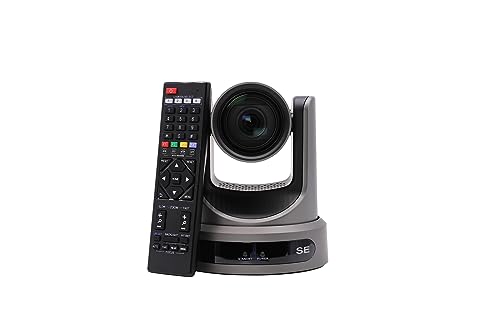
PTZOptics Move SE 20x 1080p Full HD PTZ Auto-Tracking Pan Tilt Zoom Camera
$1,281.55 Specs and sizingThe same zoom range with SDI and HDMI outputs and no NDI, which keeps the video path entirely off the church network.
Best for: The standard church livestream camera, on a balcony rail or a side wall
Check price on AmazonThis is an infrastructure decision that will outlive your cameras, so make it deliberately. SDI sends uncompressed video down 75 ohm coax with a BNC connector, one cable per camera, with latency that never varies and nothing to configure. NDI sends video over ordinary Ethernet, which means one Cat6 run per camera can carry the image, the pan tilt zoom control and the power together.
The honest question is not which technology is better. It is whether your church has somebody who understands managed switches, VLANs and network bandwidth, and who will still be there in three years. If that person does not exist, NDI turns a video problem into an IT problem nobody can solve on a Sunday morning. Note also that the ATEM Mini range is HDMI only, so either choice needs conversion at the switcher.
Side by side
| Model | Price | Maximum resolution | Optical zoom | SDI output | NDI | Power over Ethernet | Streaming output |
|---|---|---|---|---|---|---|---|
| PTZOptics Move 4K 20x Auto-Tracking PTZ Camera | $2,231.00 | 2160p30 | 20x | Yes | Yes | Yes | - |
| PTZOptics Move SE 20x 1080p Full HD PTZ Auto-Tracking Pan Tilt Zoom Camera | $1,281.55 | 1080p60 | 20x | Yes | No | Yes | SDI, HDMI, USB and IP |
What each one needs from your building
Compare the installation rather than the picture, because the picture from both is the same picture.
SDI gives one dedicated coax per camera with fixed low latency, while NDI rides the building network and carries video, control and power on one Cat6 run, which only works if somebody owns the network.
| Property | SDI | NDI | What it means in a church |
|---|---|---|---|
| Cable | 75 ohm coax with BNC | Shielded Cat6 to a gigabit switch | Coax is a new run, Cat6 may already be there |
| Distance at 1080p | About 100 m on 3G-SDI | 100 m per switch hop, extendable | NDI goes further with more switches |
| Power to the camera | A separate mains run | Power over Ethernet on the same cable | One cable per camera instead of two |
| Camera control | A separate control path | On the same cable | Fewer cables to a balcony rail |
| Switch required | None | Managed, and preferably its own VLAN | This becomes an IT project |
| Bandwidth | Dedicated per cable | Shared with everything on the network | Full NDI streams are heavy |
| Latency | Effectively fixed and very low | Higher, and it varies with the network | Matters when cutting live |
| Failure mode | A cable or a connector | Anything on the network | A guest streaming video can hurt NDI |
| Into an ATEM Mini | An SDI to HDMI converter | A computer or an NDI to HDMI converter | The Mini range is HDMI only |
NDI exists in more than one form. Full bandwidth NDI carries a very heavy stream per camera, while the lighter compressed variants used by most church cameras are far easier on a network but add latency. Confirm which one a camera supports before sizing the network.
Choose SDI when nobody at the church runs the network
SDI is the deterministic choice and that is its whole appeal. A coax run from a camera to the booth carries video and nothing else, no switch sits in the middle of it, and the latency is the same this week as it was last week. Nothing anybody does on the church network can affect it, including the guest who starts streaming video from the foyer during the sermon.
It is also the simpler thing to hand over. A volunteer can understand one cable per camera, can see which cable is unplugged, and can swap a known-good cable to test. Diagnosing an NDI dropout means understanding switch configuration, multicast and bandwidth, and very few churches have that person. The Move SE 20x at $1,281.55 takes power over Ethernet for power and control while sending video over SDI, which is a practical middle ground worth knowing about.
What it costs you is cable. Every camera position needs a new coax run pulled through the building, and in a historic or finished sanctuary that is real money and real disruption. If the walls are already open or the conduit exists, that cost drops sharply.
Choose NDI when the network is already good and somebody owns it
NDI is excellent when the conditions are met, and the conditions are specific. You need a managed gigabit switch, preferably a dedicated VLAN for video, and a person who understands both. Given that, NDI is the more flexible infrastructure by a wide margin: any camera can appear anywhere on the network, a second campus room can take a feed without new cable, and adding a camera means plugging it into a network port.
The single cable is the practical win. One Cat6 run to a balcony rail carries the image, the camera control and the power, so there is no coax, no control cable and no outlet at height. The Move 4K 20x at $2,231.00 and the 30x version at $2,699.00 both do this, and shielded Cat 6A at $29.99 is the cable to use.
Do not put video on the same network as the congregation Wi-Fi. Give it its own VLAN at minimum and its own switch if you can, because NDI is sensitive to congestion in a way that shows up as dropped frames during the one service you needed it most. If this paragraph does not describe somebody at your church, choose SDI. See multi-campus AV for where NDI genuinely pays off.
Sources
- PTZOptics published Move SE and Move 4K specifications
- Blackmagic Design published ATEM Mini input specifications
Frequently asked questions
Can we mix NDI and SDI cameras in one system?
Yes, with a converter for whichever path your switcher does not accept natively. Many churches end up with SDI for fixed camera positions and NDI for a camera that needs to move between rooms. Keep the frame rate identical across all cameras, because mixed frame rates cause cuts to stutter in ways that are hard to diagnose later.
Will NDI slow down our church internet?
It will compete for bandwidth on the local network, which is a different thing from your internet connection but matters just as much. Full bandwidth NDI streams are heavy enough to saturate a small unmanaged switch. Put video on its own VLAN or its own switch, and never share the segment with congregation Wi-Fi.
How much latency does NDI add?
Enough to notice when cutting live off a preview, and it varies with network conditions rather than staying fixed. The compressed variants used by most church cameras add more than full bandwidth NDI does. If your operator cuts by watching a multiview, test the delay under real load before committing to the infrastructure.
Does SDI work with an ATEM Mini?
Not directly. The entire ATEM Mini range is HDMI only, so an SDI camera needs an SDI to HDMI converter at the switcher. That is a small, reliable box and a common arrangement. Larger ATEM models accept SDI natively, which is worth considering if you are cabling a whole building for SDI.
Which should a church cabling a new building choose?
Run conduit to every camera position and pull Cat6A now, because it serves power over Ethernet, camera control and NDI, and it is useful even if you send video over SDI later. The cable is cheap and the access is not. Decide the video transport afterwards based on who is available to run the network.
Researched, not professional advice. This page is compiled from published manufacturer specifications, operator manuals, FCC rules, published standards and owner-review consensus, not hands-on testing. Sound system design, rigging loudspeakers overhead, and any electrical work are jobs for a qualified professional: have flown loudspeakers and their attachment points signed off by a structural engineer or a certified rigger, and have all wiring done by a licensed electrician to your local code. Wireless microphone rules change, so confirm the current FCC position before buying. As an Amazon Associate we earn from qualifying purchases.