Livestream video
Best Video Switchers for Church Livestream
Quick answer
The Blackmagic ATEM Mini Pro at $349.00 is the switcher most churches should buy. Four HDMI inputs, a multiview so the operator sees every camera, and a hardware encoder that streams straight to a platform with no computer in the chain, which is what makes it survivable for volunteers.
A switcher is what turns two cameras and a slide computer into a service. It is also the point where a church decides whether the stream depends on a computer that can update itself mid-service or on a box that only does one thing. For a volunteer team the box wins almost every time. Before you shortlist anything, settle two things: how many things need to go into it, counting cameras and the slide output, and how the audio gets in, because the audio is what viewers actually complain about. Take a line feed from the console rather than the embedded audio from a camera microphone, which is covered in full on the audio interface roundup. Specifications below are from published manufacturer figures.
On this page
- How many inputs does a church actually need?
- Get the audio right, or the switcher is wasted
- Small church, one or two cameras: $349 or a computer you already own
- Mid-size church, three cameras and an archive: $585
- Large room or multi-campus: $1,249 to $2,249
- The switchers compared
- What usually goes wrong with a church switcher
How many inputs does a church actually need?
Count sources, not cameras. The slide computer is an input. A playback laptop is an input. A confidence feed from a second room is an input. Churches routinely buy a four input switcher for three cameras and then discover the lyrics have nowhere to go. The table below counts properly for the usual arrangements.
The standard church livestream is two cameras plus a slide computer, which is three of the four HDMI inputs on an ATEM Mini Pro and leaves one spare for a playback laptop.
| Setup | Cameras | Other sources | Total inputs | Switcher that fits |
|---|---|---|---|---|
| Single camera stream | 1 | Slides | 2 | ATEM Mini Pro, with two inputs to spare |
| Standard church livestream | 2 | Slides | 3 | ATEM Mini Pro |
| Three camera service | 3 | Slides | 4 | ATEM Mini Pro, full |
| Three cameras plus playback | 3 | Slides and a playback laptop | 5 | ATEM Mini Extreme |
| Multi camera production | 4 to 6 | Slides, playback, a remote feed | 6 to 8 | ATEM Mini Extreme or Extreme ISO G2 |
Count every source that has to appear on the stream, including the slide computer, before choosing a switcher. Running a switcher completely full leaves nothing for a guest speaker with a laptop, which is the most common reason churches outgrow a switcher within a year.
Get the audio right, or the switcher is wasted
An HDMI signal from a camera carries embedded audio, which means that unless somebody deliberately changes it, the stream is carrying whatever the camera microphone heard: the room, the congregation, the air handling and the platform wedges, all at once. This is the single biggest quality problem in church livestreaming and it has nothing to do with video at all.
The fix is cheap and it takes one cable. The ATEM Mini range has 3.5 mm line inputs alongside the HDMI ones, so a line level feed from a console output can be patched straight in and the camera audio muted on every input. Better still, take a dedicated mix from a console aux or matrix so the stream gets a balance built for headphones rather than a copy of a house mix built for a room that already has acoustic sound in it. If the stream is going through a computer instead, the same feed goes through an audio interface for between $86.90 and $299.99. Either way, the camera microphones stay muted. The mixing question itself is covered in how to mix for livestream.
Small church, one or two cameras: $349 or a computer you already own
A small church has a real choice here. Streaming software on an existing computer costs nothing but the capture device and puts a general purpose machine in the critical path, where it can decide to install an update during the sermon. A hardware switcher costs $349 and does exactly one thing every week. For a volunteer rota, the hardware wins. For a church with a capable operator and no money, software is a genuine answer rather than a compromise.

Blackmagic Design ATEM Mini Pro HDMI Live Stream Switcher
$349.00 Specs and sizingHardware streaming with no computer at all, four inputs, and a multiview output so the operator sees every source at once. Simple enough that the training is one Sunday.
Best for: Two cameras plus slides with a volunteer operator
Check price on Amazon
Elgato Cam Link 4K Capture Card for DSLR, Camcorder, Action Cam, USB-A Connector, USB 3.0 Hardware Interface, Black, Windows 10/11 and macOS
$89.99If the church is starting with streaming software on a computer, this is the capture device that works. The cheap HDMI dongles drop frames and lose audio sync mid-service.
Best for: One camera into a computer, before a switcher is affordable
Check price on Amazon
Behringer UMC202HD Audiophile 2x2, 24-Bit/192 kHz USB Audio Interface with Midas Mic Preamplifiers
$86.90Two channels of Midas preamp at $86.90 to take a line feed from the console into the streaming computer. Whatever you switch with, the audio must not come from a camera.
Best for: The cheapest route to stream audio that sounds like the mix
Check price on AmazonWho should not buy this tier: Churches that re-edit the service afterwards for a podcast or a highlights reel, where isolated recording of each input saves hours.
Mid-size church, three cameras and an archive: $585
The step up that matters at this size is not more inputs, it is isolated recording. A switcher that records every input separately alongside the programme mix means a bad cut is fixable afterwards instead of living in the archive forever, and it turns the Sunday service into usable material for a podcast, a highlights clip or next week social media without filming anything extra.

Blackmagic Design ATEM Mini Pro ISO HDMI Switcher
$585.00The Pro with isolated recording of all four inputs plus an editing project file, so a mis-timed cut can be fixed after the service rather than apologised for.
Best for: Churches producing a podcast, a highlights reel or clips from the service
Check price on Amazon Blackmagic Design ATEM Mini Pro HDMI Live Stream Switcher
$349.00 Specs and sizingThe same switching, streaming and multiview without the isolated recording. If nobody is going to re-edit the service, the $236 difference buys a fair share of a camera.
Best for: A church that streams live and never touches the recording again
Check price on AmazonWho should not buy this tier: Churches running more than four sources, where the input count rather than the recording is the binding constraint.
Large room or multi-campus: $1,249 to $2,249
Eight inputs, multiple keyers and a dedicated video volunteer. This is a production rather than a recording, and the reason to be here is usually graphics: lower thirds, sermon titles and lyrics keyed over camera rather than cut to as a separate source. That is a materially better looking stream and it needs a person whose whole job on Sunday is the video.
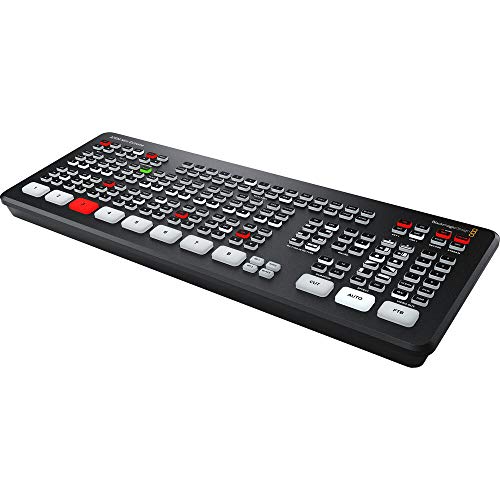
Blackmagic Design ATEM Mini Extreme HDMI Switcher
$1,249.00 Specs and sizingEight inputs, four chroma keyers and two media players, which covers a multi camera room with lower thirds and lyrics without a separate graphics computer in the chain.
Best for: Four or more cameras, or a service with genuine on-screen graphics
Check price on Amazon
Blackmagic Design ATEM Mini Extreme ISO G2 8-Input HDMI Live Production Switcher
$2,249.00The current generation Extreme with isolated recording of every input. The most capable switcher here and more than the great majority of churches will ever use.
Best for: A multi-campus broadcast operation with a dedicated video team
Check price on Amazon
Focusrite Scarlett 18i16 4th Gen USB-C Audio Interface
$569.99 Specs and sizingEighteen inputs, enough to multitrack the whole service so the stream audio can be remixed afterwards rather than lived with. At this production level the audio should be recorded as carefully as the video.
Best for: Churches producing a polished archive or podcast from the Sunday recording
Check price on AmazonWho should not buy this tier: A church with two cameras and one volunteer. An eight input switcher with four keyers is four times the price of an ATEM Mini Pro and adds a great deal of surface for a volunteer to get wrong on a Sunday morning, with no visible difference on a two camera stream. Buy a better camera instead.
The switchers compared
| Model | Price | Video inputs | Maximum resolution | Streaming output | Video outputs |
|---|---|---|---|---|---|
| Blackmagic Design ATEM Mini Pro HDMI Live Stream Switcher | $349.00 | 4 | 1080p60 | Direct to YouTube, Facebook and RTMP | 2 |
| Blackmagic Design ATEM Mini Pro ISO HDMI Switcher | $585.00 | 4 | 1080p60 | Direct to YouTube, Facebook and RTMP | - |
| Blackmagic Design ATEM Mini Extreme HDMI Switcher | $1,249.00 | 8 | 1080p60 | Direct to RTMP | 4 |
| Blackmagic Design ATEM Mini Extreme ISO G2 8-Input HDMI Live Production Switcher | $2,249.00 | 8 | 1080p60 | Direct to RTMP | - |
What usually goes wrong with a church switcher
Buying exactly enough inputs. A four input switcher with four sources connected has no room for the guest speaker who arrives with a laptop, and that is the single most common reason a church replaces a switcher within a year. Leave one input free. Second, HDMI cable length: HDMI is not designed for long runs, and a camera forty feet from the rack needs an active cable or a signal extender rather than the longest passive cable the shop had. Intermittent video that works at rehearsal and fails at the service is nearly always this.
Third, the audio arriving embedded from the cameras because nobody muted it, which puts the room rather than the mix on the stream. Fourth, nobody watching the actual output: the multiview shows the operator what they are cutting, but somebody should also be seeing the stream as the congregation at home sees it, delayed and all. Put a phone or a spare tablet on the stream at the back. For the whole chain see how to livestream a church service and church livestream audio setup, and for how the switcher choices differ at the top end, ATEM Mini Pro versus Extreme.
How we chose
We did not test these products in person and we never claim to. Picks are researched from manufacturer specification sheets and operator manuals, FCC rules where spectrum is involved, published standards, warranty terms, and the recurring themes in verified owner reviews. Every pick is matched to a real room size, seat count or input list rather than to a price bracket, and it is placed in the tier where its capability actually belongs. Where a product is wrong for most churches we say so on the page.
Sources
- Blackmagic Design published specifications for the ATEM Mini Pro, Pro ISO, Extreme and Extreme ISO G2
- Focusrite published specifications for the Scarlett 4th generation range
- Published platform guidance on stream ingest and encoder settings
Frequently asked questions
What video switcher should a church use for livestreaming?
For most churches, the Blackmagic ATEM Mini Pro at $349.00. Four HDMI inputs cover two or three cameras plus the slide computer, the multiview output lets the operator see every source at once, and the hardware encoder streams directly to a platform with no computer in the chain. That last point is what makes it workable for a rotating volunteer team.
How many inputs does a church switcher need?
Count every source, not just cameras. The slide computer is an input, and so is a playback laptop or a feed from another room. The standard church livestream of two cameras plus slides uses three inputs. Buy a switcher with at least one input spare, because a guest speaker arriving with a laptop is the usual reason a church outgrows a switcher.
Is a hardware switcher better than streaming software for a church?
For a volunteer team, yes. A hardware switcher does one job the same way every week and cannot decide to install an update during the sermon. Streaming software is more flexible and cheaper to start with, and it is a genuine answer for a church with a capable, consistent operator. If you use a computer, dedicate it entirely to streaming and disable automatic updates.
How do we get good audio into a video switcher?
Take a line level feed from a mixing console output into the 3.5 mm audio input on the switcher, and mute the embedded audio on every HDMI camera input. Better still, build a dedicated stream mix on a console aux or matrix, because a house mix is balanced for a room that already contains acoustic sound and translates poorly to headphones.
Do we need isolated recording on a church switcher?
Only if somebody re-edits the service afterwards. Isolated recording captures every input separately alongside the programme, so a mis-timed cut can be fixed and the service becomes raw material for a podcast or highlights clips. If the recording is never touched again, the $236 difference between the Pro and the Pro ISO is better spent elsewhere.
Why does our video drop out intermittently?
Most often HDMI cable length. HDMI was never designed for long runs, and a passive cable of forty feet or more will work at rehearsal and fail during a service as things warm up. Use an active cable or a signal extender for anything past about twenty five feet. The other common cause is a network switch shared with other traffic on an NDI camera system.
Researched, not professional advice. This page is compiled from published manufacturer specifications, operator manuals, FCC rules, published standards and owner-review consensus, not hands-on testing. Sound system design, rigging loudspeakers overhead, and any electrical work are jobs for a qualified professional: have flown loudspeakers and their attachment points signed off by a structural engineer or a certified rigger, and have all wiring done by a licensed electrician to your local code. Wireless microphone rules change, so confirm the current FCC position before buying. As an Amazon Associate we earn from qualifying purchases.