Livestream systems
Starter Church Livestream System
Quick answer
A starter church livestream system costs about $2,401. One camera, a hardware switcher that streams to YouTube with no computer, and a real audio feed from the console. At 1080p30 it needs about 4,700 kbps, so roughly 10 Mbps of measured upload.
The single biggest quality problem in church livestreaming is audio, not video. A congregation forgives a static wide shot and abandons a stream with hollow, distant sound, because that is what a microphone on top of a camera produces. So the first two purchases are a proper audio feed from the console and a capture device that does not drop frames, and the camera comes third.
The second biggest problem is the volunteer. A stream that depends on a laptop staying awake, an application updating correctly and somebody knowing the software will fail on the Sunday the person who set it up is away. A hardware switcher that streams on its own removes almost all of that.
The complete build: $2,401
Audio, which matters most
Do this before buying a camera. A good camera with camera-microphone audio is a worse stream than a webcam with a console feed.
| Item | Why this one | Qty | Price | Buy |
|---|---|---|---|---|
 Focusrite Scarlett 2i2 4th Gen USB-C Audio Interface Focusrite Scarlett 2i2 4th Gen USB-C Audio Interface | A clean stereo feed from the console into the switcher or computer. This one purchase fixes the most common complaint about church livestreams. | 1 | $224.99 | Price |
 Sennheiser HD 280 Pro Headphone Sennheiser HD 280 Pro Headphone | Closed-back headphones so somebody can actually hear what is going out, which is the only way to catch a problem before the congregation does. | 1 | $85.49 | Price |
| Audio, which matters most subtotal | $310.48 | |||
Video
| Item | Why this one | Qty | Price | Buy |
|---|---|---|---|---|
 Blackmagic Design ATEM Mini Pro HDMI Live Stream Switcher Blackmagic Design ATEM Mini Pro HDMI Live Stream Switcher | A hardware switcher with a built-in encoder and a multiview output, so the operator sees every source and the stream does not depend on a computer. | 1 | $349.00 | Price |
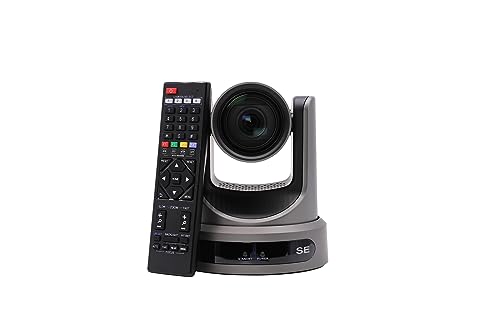 PTZOptics Move SE 20x 1080p Full HD PTZ Auto-Tracking Pan Tilt Zoom Camera PTZOptics Move SE 20x 1080p Full HD PTZ Auto-Tracking Pan Tilt Zoom Camera | A 20x pan tilt zoom camera powered over the same Ethernet cable that carries its control, so one cable does everything and one volunteer can run it. | 1 | $1,281.55 | Price |
 Cable Matters 10Gbps Snagless Shielded Cat 6A Ethernet Cable, 100ft Cable Matters 10Gbps Snagless Shielded Cat 6A Ethernet Cable, 100ft | Shielded Cat 6A for the camera, carrying both power and control on one run. | 2 | $59.98 | Price |
| Video subtotal | $1,690.53 | |||
Rack and power
| Item | Why this one | Qty | Price | Buy |
|---|---|---|---|---|
 Gator Cases Content Creator Series Wooden Studio Rack Case with 15.25" Rackable Depth, 12U (GR-STUDIO-12U) Gator Cases Content Creator Series Wooden Studio Rack Case with 15.25" Rackable Depth, 12U (GR-STUDIO-12U) | A small rack so the switcher, the interface and the network gear live together and nothing gets unplugged between services. | 1 | $199.99 | Price |
 Furman M-8Dx Merit X Series 8 Outlet Power Conditioner & Surge Protector with LED Voltmeter & Dual Lights Plus Hosa 18 Gauge Electrical Extension Cable Furman M-8Dx Merit X Series 8 Outlet Power Conditioner & Surge Protector with LED Voltmeter & Dual Lights Plus Hosa 18 Gauge Electrical Extension Cable | Filtered power with a voltmeter for the video position. | 1 | $199.95 | Price |
| Rack and power subtotal | $399.94 | |||
Equipment only. The thing this total cannot include, and the thing that most often stops a church livestream working, is the building’s internet. Measure the upload speed on a wired connection at service time, not the number on the bill, before ordering any of this.
- Resolution
- 1080p at 30 fps
- Bitrate
- About 4,700 kbps
- Upload needed
- About 10 Mbps measured, wired
- Data per service
- About 2.1 GB per hour
- Volunteers needed
- 1
- Computer required
- No
Prices were accurate when this list was compiled and change often, so confirm each one before the committee votes. Quantities are multiplied into the total. This total covers equipment only: it does not include installation labor, rigging, conduit, electrical work or permits, which on an installed system commonly add 30 to 60 percent.
What upload speed does a church livestream actually need?
The rule that saves churches is the headroom multiple. A stream needs roughly twice its bitrate in measured upload, because the building is also carrying Wi-Fi, phones and the office, and because the advertised speed on the bill is a download figure with a much smaller upload number behind it.
A 1080p30 church livestream needs about 4,700 kbps, which means roughly 10 Mbps of measured upload once you allow the standard two times headroom.
| Resolution | Video bitrate | Total with audio | Upload needed | Data per hour |
|---|---|---|---|---|
| 720p 30 fps | 3,000 kbps | 3,128 kbps | About 6.3 Mbps | About 1.4 GB |
| 1080p 30 fps | 4,500 kbps | 4,660 kbps | About 9.3 Mbps | About 2.1 GB |
| 1080p 60 fps | 6,800 kbps | 6,960 kbps | About 13.9 Mbps | About 3.1 GB |
| 1440p 30 fps | 9,000 kbps | 9,192 kbps | About 18.4 Mbps | About 4.1 GB |
| 4K 30 fps | 15,000 kbps | 15,192 kbps | About 30.4 Mbps | About 6.8 GB |
Measure upload on a WIRED connection at the time the service actually happens. A Tuesday afternoon Wi-Fi speed test tells you almost nothing about Sunday at 10am.
Getting the audio right, which is the whole thing
- Take audio from the console, not the camera. A camera microphone hears the room, which means reverberation and the person coughing three rows back. The console feed hears the microphones.
- Use a separate mix if you can spare the sends. The house mix is built for a room that is already full of acoustic instruments. In headphones, the drums and the acoustic guitar that the room supplies for free are simply missing.
- Set the level once and leave it. Aim for peaks around minus 6 dBFS into the interface. Streaming platforms normalise loudness, so there is nothing to gain from running hot and everything to lose.
- Listen on headphones every week. Somebody has to hear what is going out. This single habit catches more problems than any piece of equipment.
- Check the stream on a phone before the service starts. Watch thirty seconds of the countdown on a phone on mobile data, not on the church Wi-Fi, which is the only way to see what a viewer actually gets.
What you can skip
Skip the second camera. A single well-placed wide shot with excellent audio is a better stream than two cameras cut badly by a volunteer learning on a Sunday morning. Add the second camera once the first one is boring, not before.
Skip 4K. Almost nobody watches a church service in 4K, it multiplies your bitrate requirement by three or four, and most church internet cannot carry it. 1080p30 is the right answer.
Skip the computer and the streaming software. It is more capable and it is the most common failure point on a volunteer rota. The hardware switcher does not update itself the night before Easter.
What to upgrade first
The internet, if the measured upload is under about 10 Mbps. Nothing else on this list matters if the stream buffers. Measure it wired, during a service, not on a Tuesday afternoon on Wi-Fi.
Then lighting, before a second camera. A camera can only work with the light in the room, and most sanctuaries are lit for a congregation reading rather than for a face on camera. Improving the light on the speaker does more for the picture than any camera upgrade at this level.
Frequently asked questions
How much does it cost to livestream a church service?
About $2,401 for this equipment list, covering one camera, a hardware switcher, an audio interface and a small rack. The recurring cost is the internet connection and, if the building’s upload is inadequate, a service upgrade. Streaming to YouTube or Facebook itself is free.
What internet speed do I need to livestream a church service?
For 1080p at 30 frames per second, about 4,700 kbps of bitrate, which means roughly 10 Mbps of measured upload once you allow the standard two times headroom for everything else in the building. Measure it on a wired connection at the time the service actually happens, because the figure on the bill is a download speed and Sunday morning is when the building is busiest.
Do I need a computer to livestream church?
No, and for a volunteer-run stream you are better off without one. A hardware switcher with a built-in encoder streams straight to YouTube or Facebook with a network cable and no software at all. That removes operating system updates, application crashes and a sleeping laptop, which are collectively the most common reason a church stream fails.
Why does our livestream audio sound so bad?
Almost certainly because it is coming from a microphone on the camera rather than from the mixing console. A camera microphone picks up the room, so viewers hear reverberation, air handling and the congregation instead of the microphones. An audio interface taking a feed from the console fixes it for under $250 and is the highest-value purchase in church livestreaming.
Should we stream in 4K?
No. It multiplies the bitrate requirement by three or four, most church internet connections cannot carry it, and virtually nobody watches a church service in 4K. Where 4K is genuinely useful is shooting in 4K and delivering 1080p, because it lets you crop into a wide shot without losing resolution, which effectively gives you a second camera angle from one camera.
Researched, not professional advice. This page is compiled from published manufacturer specifications, operator manuals, FCC rules, published standards and owner-review consensus, not hands-on testing. Sound system design, rigging loudspeakers overhead, and any electrical work are jobs for a qualified professional: have flown loudspeakers and their attachment points signed off by a structural engineer or a certified rigger, and have all wiring done by a licensed electrician to your local code. Wireless microphone rules change, so confirm the current FCC position before buying. As an Amazon Associate we earn from qualifying purchases.